
Lightbot is a mobile and web puzzle game teaching programming logic that helps enhance problem-solving, planning and foresight, and deductive reasoning. It offers a fun and interactive way to learn the basics of coding by guiding a robot through a series of challenges using programming commands. This game is perfect for beginners and anyone interested in developing logical thinking skills in an engaging environment.
What is Lightbot? An overview
History, origin
Lightbot was created by Danny Yaroslavski as an educational tool to introduce programming concepts to young learners. It was designed to make coding accessible and enjoyable by using puzzles that require players to sequence commands logically. Since its launch, it has gained popularity in classrooms and among parents seeking to teach coding fundamentals without overwhelming technical jargon.
Versions and editions
The game is available in several editions, including a free web-based version and paid mobile apps. The price range for the mobile versions typically falls between $2 to $5, depending on the platform and region. Lightbot supports multiple languages, including English, Spanish, French, German, and more, making it accessible worldwide.
Platform availability
Lightbot can be played on various platforms such as web browsers, iOS devices, and Android smartphones and tablets. This versatility ensures that players can enjoy the game on their preferred devices without compatibility issues.
Audience & age
The game is designed primarily for children aged 8 and up but is suitable for anyone interested in learning programming logic. Its intuitive interface and gradual increase in difficulty make it accessible for beginners while still offering challenges for more experienced players.
Educational Value – What skills does Lightbot develop?
- Problem-solving: Players must analyze each puzzle and figure out the correct sequence of commands to navigate the robot successfully. This encourages critical thinking and creative solutions.
- Planning and foresight: The game requires anticipating the robot’s movements and planning several steps ahead to avoid mistakes and complete levels efficiently.
- Deductive reasoning: By testing different command combinations and learning from errors, players develop the ability to deduce the best approach to solve increasingly complex puzzles.
While no prior coding knowledge is necessary, a basic understanding of cause and effect helps players grasp the game’s mechanics quickly.
How to play Lightbot?
What does it look like?
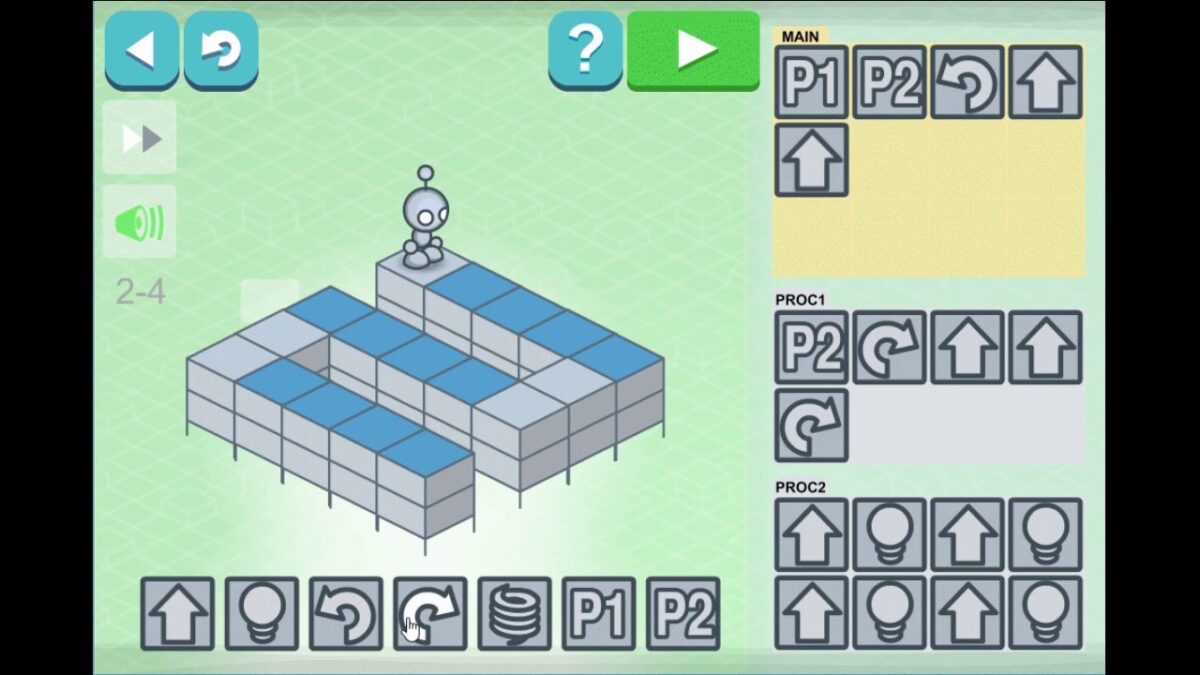
The game is entirely digital and does not come with physical components. It features a clean, colorful interface with a grid-based map where the robot moves. Players interact with command blocks representing actions like move forward, turn, jump, and light up tiles. The game runs smoothly on most modern smartphones, tablets, and desktop browsers, requiring minimal technical specifications.
Core concept, gameplay style & mechanics
Players program the robot by arranging commands in a sequence to solve puzzles. Each level introduces new challenges and commands, gradually increasing complexity. The game emphasizes logical sequencing, loops, and conditionals, laying a foundation for understanding programming concepts.
Objective of the game
The primary goal is to guide the robot to light up all designated tiles on the grid by programming the correct sequence of commands. Completing each level unlocks the next, with increasing difficulty and complexity.
Step-by-step basic gameplay loop
- Select commands from the available options.
- Arrange them in the programming area to create a sequence.
- Run the program to see the robot execute the commands.
- Observe the outcome and adjust the sequence if the robot fails to complete the task.
- Repeat until the level is successfully completed.
Common mistakes
- Not planning ahead, which leads to inefficient or incorrect command sequences.
- Overlooking the robot’s orientation, causing unexpected moves.
- Failing to use loops when appropriate, resulting in unnecessarily long programs.
Expert tips
- Think several steps ahead before placing commands.
- Use loops to repeat actions and simplify your program.
- Test small parts of your sequence before running the entire program.
- Pay close attention to the robot’s facing direction after each command.
Alternative games to Lightbot
Code Master is a great alternative that also focuses on programming logic through puzzles. It offers a physical board game experience combined with coding challenges, making it a hands-on option for learners who enjoy tactile play. More details can be found here.
CodeCombat is another excellent alternative that immerses players in a fantasy-themed coding adventure. It teaches real programming languages like Python and JavaScript through interactive gameplay, suitable for those who want to advance beyond block-based logic puzzles. Explore it here.
Lightbot FAQ
What age is Lightbot suitable for?
Lightbot is designed for children aged 8 and above but is suitable for anyone interested in learning programming logic in a fun and accessible way.
Do I need prior coding knowledge to play Lightbot?
No prior coding experience is required. The game introduces programming concepts gradually and intuitively, making it easy for beginners to start learning.
On which platforms can I play Lightbot?
Currently Lightbot is available on weiOs devices. According to Lightbot’s website there is also a Google Play app for android devices but we have not been able to find it.
Does Lightbot support multiple languages?
Yes, the game supports several languages including English, Spanish, French, and German, among others.
Can Lightbot help me learn real programming?
While Lightbot focuses on fundamental programming logic and problem-solving skills, it provides a strong foundation that can be built upon with more advanced coding platforms.
For further learning and playing
Tynker is a coding platform that builds on the skills learned in Lightbot by offering block-based and text-based programming lessons. It is ideal for progressing from basic logic puzzles to creating games and apps. Discover more about Tynker here.
Scratch is another excellent next step, providing a user-friendly environment to create interactive stories, games, and animations using block coding. It encourages creativity while reinforcing programming concepts introduced in Lightbot. Learn more about Scratch here.
To sum up
Lightbot is an engaging puzzle game that introduces programming logic through fun challenges. It develops essential skills like problem-solving, planning, and deductive reasoning without requiring prior coding knowledge. With its wide availability and educational value, it serves as a great starting point for anyone interested in learning to code.
To play Lightbot
Web browser: https://lightbot.com/
Smartphone: Apple App Store
Sources
Player Reviews
There are no reviews yet. Be the first one to write one.