
Scratch is a visual language for creating interactive stories and games that helps enhance problem-solving, creative thinking, storytelling, and aesthetic appreciation. It offers an engaging way for users of all ages to dive into coding by snapping together blocks instead of writing lines of code. As a result, it lowers the barrier to entry and encourages experimentation and creativity.
What is Scratch? An overview
History, origin
Scratch was developed by the Lifelong Kindergarten Group at the MIT Media Lab, first released in 2007. It was designed to make programming accessible and fun for young learners and beginners. Its block-based coding system allows users to create animations, games, and interactive stories without needing prior coding knowledge.
Versions and editions
Scratch is available primarily as a free online platform accessible via web browsers. There is also an offline editor for desktop computers, supporting Windows, macOS, and some Linux distributions. The platform is multilingual, offering interfaces in over 70 languages to accommodate a global user base. Since it is free to use, there is no price range associated with the game.
Platform availability
- Web browser: Accessible on any modern browser without installation.
- Desktop offline editor: Downloadable for Windows, macOS, and Linux.
- Mobile: There is no official Scratch app for smartphones, but the web version can be used on tablets.
Audience & age
Scratch is designed for learners aged 8 and up, but it is widely used by educators and hobbyists of all ages. Its intuitive interface makes it suitable for beginners, while its depth allows more advanced users to create complex projects.
Educational Value – What skills does Scratch develop?
- Problem-solving: Users learn to break down challenges into smaller tasks and debug their projects, fostering logical thinking.
- Creative thinking: The open-ended nature encourages experimentation with ideas, designs, and interactive elements.
- Storytelling: Scratch supports narrative creation through sprites, backdrops, and sound, helping users craft engaging stories.
- Aesthetic appreciation: Users develop an eye for design by customizing graphics, animations, and user interfaces.
No prior coding experience is required, making it accessible to complete beginners. Basic computer skills such as using a mouse and keyboard are helpful.
How to play Scratch?
What does it look like?
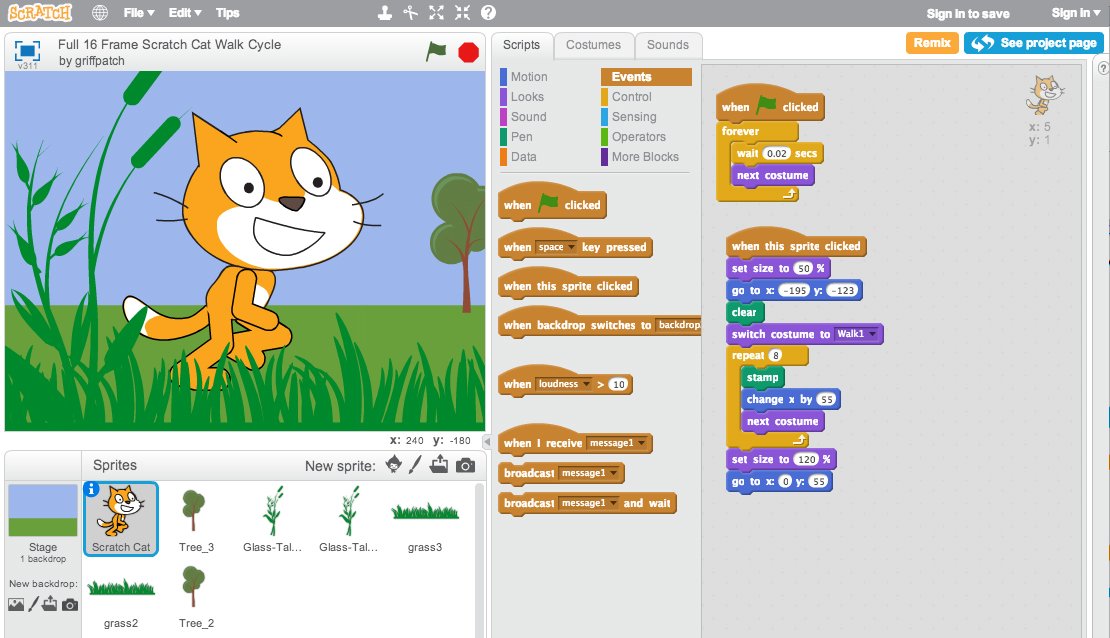
Scratch is primarily a digital platform. When using the online or offline editor, users see a workspace divided into several areas: the block palette with coding commands, the scripting area where blocks are assembled, the stage where animations and games run, and a sprite list to manage characters and objects.
Core concept, gameplay style & mechanics
The core concept revolves around dragging and snapping together colorful coding blocks that represent programming commands. This visual approach eliminates syntax errors common in text-based coding. Users create scripts that control sprites’ movements, sounds, and interactions to build games or stories.
Objective of the game
Unlike traditional games, Scratch’s objective is open-ended: users aim to create projects that express their ideas, solve problems, or entertain. Success is measured by the completion and functionality of their interactive stories or games.
Step-by-step basic gameplay loop
- Choose or create sprites and backdrops.
- Drag blocks from the palette to the scripting area to build scripts.
- Test the project by running it on the stage.
- Debug or modify scripts based on test results.
- Share the finished project with the Scratch community or save it locally.
Common mistakes
- Not connecting blocks properly, causing scripts not to run.
- Forgetting to add event blocks to start scripts.
- Overcomplicating projects without testing incrementally.
- Neglecting to save projects regularly.
Expert tips
- Start with small projects to master basic blocks before advancing.
- Use the “backpack” feature to reuse code snippets across projects.
- Explore the Scratch community to learn from shared projects.
- Experiment with sounds and costumes to enhance storytelling.
Alternative games to Scratch
Tynker is a popular alternative to Scratch that also uses block-based coding to teach programming concepts. It offers structured lessons and a gamified learning path, making it ideal for classrooms and self-paced learners. Tynker supports creative coding, game design, and even drone programming. You can explore more about Tynker here.
Scratch FAQ
What age is Scratch suitable for?
Scratch is designed for users aged 8 and above but can be enjoyed by beginners of all ages due to its intuitive interface.
Is Scratch free to use?
Yes, Scratch is completely free and accessible online, with no charges for creating or sharing projects.
Do I need coding experience to use Scratch?
No prior coding experience is needed. Scratch’s visual blocks make it easy for beginners to start programming right away.
Can I share my Scratch projects online?
Yes, the Scratch platform includes a community where users can share, remix, and comment on projects.
What platforms support Scratch?
Scratch runs on modern web browsers and has an offline editor for Windows, macOS, and Linux.
To sum up
Scratch is a versatile visual programming language that makes coding accessible and fun. It fosters essential skills like problem-solving, creative thinking, storytelling, and aesthetic appreciation through an open-ended, interactive platform. Whether you’re a beginner or an educator, it provides an excellent foundation for digital creativity.
To play Scratch
Web browser: https://scratch.mit.edu/
PC: https://scratch.mit.edu/download
Player Reviews
There are no reviews yet. Be the first one to write one.