
Tynker is a platform with interactive courses and creative coding activities that helps enhance problem-solving, creative thinking, planning, and foresight. It’s designed to make coding accessible and fun for kids and beginners, providing a hands-on experience that builds essential skills through engaging projects. Whether you’re new to programming or looking to expand your abilities, this platform offers a structured yet playful environment to learn and create.
What is Tynker? An overview
History, origin
Tynker was founded in 2012 with the mission to empower children to become creators of technology. It emerged as a response to the growing need for accessible coding education, especially for younger learners. Over the years, it has evolved into a comprehensive platform used by millions of students worldwide, partnering with schools and educators to integrate coding into the curriculum.
Versions and editions
The platform offers multiple editions tailored for different users: individual learners, classrooms, and schools. Pricing varies accordingly, with individual subscriptions typically ranging from $8 to $20 per month depending on the plan. There are also free starter courses available. Tynker supports multiple languages including English, Spanish, French, and German, making it accessible globally.
Platform availability
Tynker is accessible through web browsers on PCs and Macs, and it also offers apps for iOS and Android devices. This flexibility allows learners to access courses and coding activities anytime, anywhere.
Audience & age
The platform is primarily designed for children aged 7 to 14, but beginners of all ages can benefit from it. Its step-by-step approach and visual programming interface make it especially suitable for young learners with no prior coding experience.
Educational Value – What skills does Tynker develop?
- Problem-solving: The game encourages learners to break down complex challenges into manageable steps, fostering logical thinking and troubleshooting skills.
- Creative thinking: By allowing users to create their own games, animations, and apps, it nurtures imagination and innovation.
- Planning and foresight: Coding projects require planning sequences and anticipating outcomes, which builds foresight and organizational skills.
While no prior coding knowledge is required to start, basic computer literacy helps learners navigate the platform more easily.
How to play Tynker?
What does it look like?
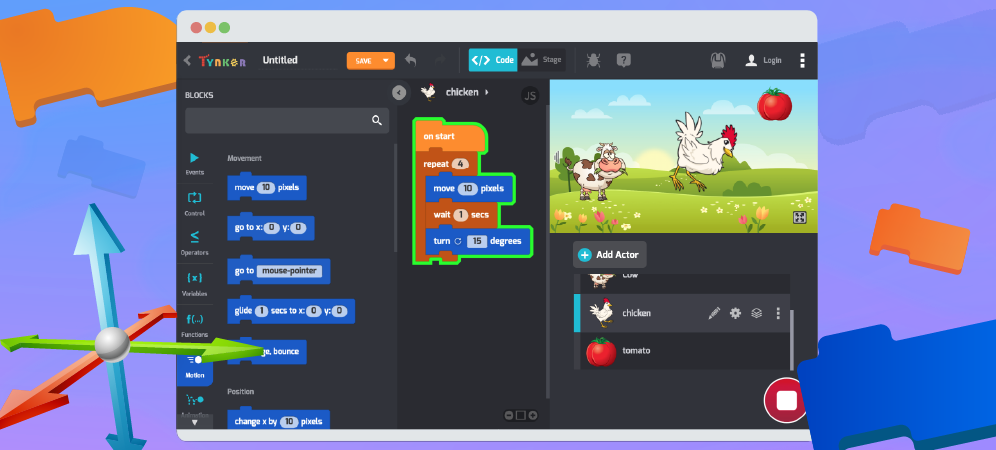
Tynker is a digital platform accessible via web browsers or mobile apps. There is no physical component to purchase. The interface features colorful blocks that represent code commands, which users drag and drop to build programs. The platform includes tutorials, puzzles, and creative projects.
Core concept, gameplay style & mechanics
The core concept revolves around visual block-based coding, making programming intuitive and approachable. Users solve puzzles by sequencing commands correctly and create projects by combining different coding blocks. This hands-on approach helps learners understand programming logic without typing complex code.
Objective of the game
The main objective is to complete coding challenges and build creative projects that demonstrate mastery of programming concepts. As users progress, they unlock more advanced lessons and tools to expand their skills.
Step-by-step basic gameplay loop
- Select a course or project to start.
- Follow interactive lessons that introduce coding concepts.
- Use drag-and-drop blocks to solve puzzles or create projects.
- Test and debug your code to achieve the desired outcome.
- Complete challenges to unlock new content and skills.
Common mistakes
- Skipping foundational lessons, which can lead to confusion later.
- Ignoring error messages instead of debugging code actively.
- Trying to rush through projects without planning the code structure.
Expert tips
- Take time to understand each coding block’s function before using it.
- Experiment with modifying existing projects to deepen understanding.
- Use the platform’s community forums and resources for additional help.
Alternative games to Tynker
Scratch is a widely known alternative that also uses block-based coding to teach programming fundamentals. Like the game, Scratch encourages creativity and problem-solving through interactive projects. It’s free and has a large community, making it a great option for learners who want a similar experience. You can explore Scratch at https://miletogames.com/games/scratch.
Tynker FAQ
What age group is Tynker suitable for?
Tynker is mainly designed for children aged 7 to 14, but beginners of any age can use it effectively.
Do I need prior coding experience to use Tynker?
No prior coding experience is needed. The platform starts with basic concepts and gradually increases in complexity.
Is Tynker free to use?
Tynker offers free starter courses, but full access requires a subscription that varies in price depending on the plan.
On which devices can I use Tynker?
You can use Tynker on web browsers via PC or Mac, as well as on iOS and Android devices through their apps.
Does Tynker support multiple languages?
Yes, it supports several languages including English, Spanish, French, and German.
For further learning and playing
Elevator Saga is a coding challenge game that builds on the skills learned in the platform by focusing on JavaScript programming to control elevator systems. It’s a great next step for learners interested in deepening their coding abilities with real-world applications. Learn more at Elevator Saga.
Untrusted is another coding game that challenges players to manipulate JavaScript code to escape levels. It encourages critical thinking and advanced problem-solving, making it a coherent continuation for those who enjoyed the platform’s creative coding activities. Find out more at Untrusted.
To sum up
The platform is a versatile and engaging way to learn coding through interactive courses and creative projects. It effectively develops problem-solving, creative thinking, planning, and foresight skills, making it an excellent choice for beginners and young learners.
To play Tynker
Web browser: https://www.tynker.com/
Smartphone: Google Play Store, Apple Store
Sources
Player Reviews
There are no reviews yet. Be the first one to write one.