
Introduction
CodeMonkey is a platform where kids learn coding by solving puzzles that helps enhance problem-solving, pattern recognition, planning and foresight. It offers a fun and interactive way for young learners to dive into the world of programming through engaging challenges. This educational game bridges the gap between play and learning, making coding accessible and enjoyable.

What is CodeMonkey? An overview
History, origin
CodeMonkey was developed by a team of educators and programmers aiming to create a coding platform that is both educational and entertaining for children. Since its inception, it has grown into a popular tool used by schools and parents worldwide to introduce coding concepts in a playful environment.
Versions and editions
The game is available in multiple editions tailored for different age groups and skill levels. Pricing typically ranges from free access to basic levels, up to subscription plans costing approximately $5 to $15 per month for full access. CodeMonkey supports several languages including English, Spanish, and Hebrew, making it accessible to a broad audience.
Platform availability
CodeMonkey is primarily played on web browsers, requiring an internet connection and a compatible device such as a PC, Mac, or Chromebook. It does not require high-end hardware, making it accessible for most users. There is no official mobile app, so gameplay is optimized for desktop use.
Audience & age
The game is designed for children aged 8 and up, including beginners with no prior coding experience. It is suitable for classroom settings as well as individual learning at home.
Educational Value – What skills does CodeMonkey develop?
- Problem-solving: Players encounter coding puzzles that require logical thinking and troubleshooting to progress. The game encourages breaking down complex problems into manageable steps.
- Pattern recognition: By identifying coding patterns and repeating sequences, learners develop their ability to recognize and apply patterns effectively.
- Planning and foresight: Success in the game depends on planning code sequences ahead and anticipating outcomes, fostering strategic thinking.
Prior knowledge is not necessary to start playing. The game introduces coding concepts gradually, making it beginner-friendly.
How to play CodeMonkey?
What does it look like?
The game is accessed digitally through a web browser. It features a colorful, cartoon-style interface with a monkey character navigating through various levels. Players write code using a simplified programming language to solve puzzles. No physical components are needed.
Core concept, gameplay style & mechanics
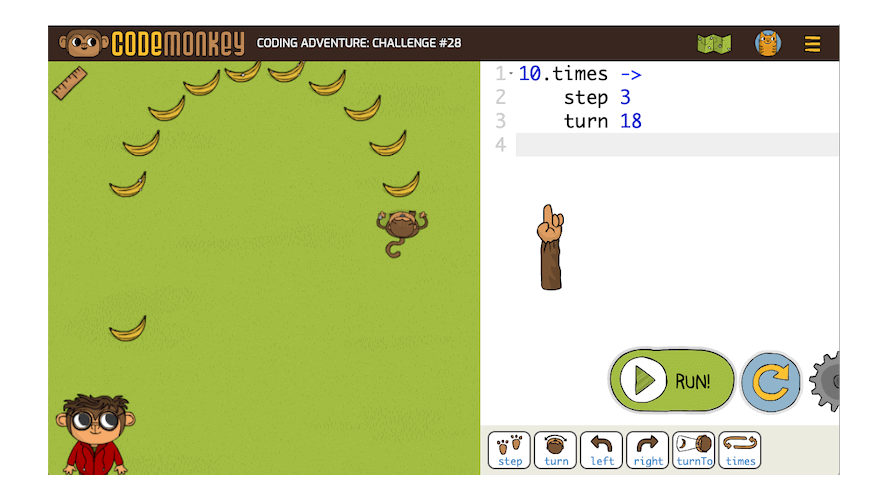
The gameplay revolves around writing code commands to guide the monkey through obstacles and collect bananas. It uses a step-by-step coding approach where players input commands and see immediate results, reinforcing learning. The mechanics emphasize logical sequencing and debugging.
Objective of the game
The main goal is to complete coding challenges by successfully programming the monkey to reach bananas and solve puzzles. Each level increases in difficulty, introducing new concepts and requiring more complex coding solutions.
Step-by-step basic gameplay loop
- Read the level instructions and understand the puzzle.
- Write code commands to move the monkey and interact with the environment.
- Run the code to see the monkey perform actions.
- Debug and adjust the code if the monkey does not complete the task.
- Advance to the next level upon success.
Common mistakes
- Skipping reading instructions carefully, leading to incorrect code.
- Not testing code frequently, which can cause confusion when errors accumulate.
- Overlooking syntax details in the coding language used.
Expert tips
- Break problems into smaller parts and solve step-by-step.
- Use the game’s hints and tutorials to understand new commands.
- Practice regularly to build coding fluency and confidence.
Alternative games to CodeMonkey
Code Master is a great alternative that focuses on logic and sequencing through physical and digital puzzles. It helps reinforce similar coding concepts in a tactile way. More information can be found here.
CodeCombat offers a fantasy-themed coding experience where players write real code to control characters in a game world. It is excellent for learners who want a more immersive coding adventure. Discover more here.
CodeMonkey FAQ
What age group is CodeMonkey suitable for?
CodeMonkey is designed for children aged 8 and above, making it accessible to beginners and young learners interested in coding.
Is prior coding knowledge required to play?
No prior coding experience is necessary. The game introduces programming concepts gradually and is beginner-friendly.
On which platforms can I play CodeMonkey?
CodeMonkey is primarily played on web browsers on PCs, Macs, and Chromebooks. It does not have an official mobile app.
Does CodeMonkey support multiple languages?
Yes, the game supports several languages including English, Spanish, and Hebrew.
How much does CodeMonkey cost?
There is a free version with limited access, and subscription plans typically range from $5 to $15 per month for full access.
For further learning and playing
Scratch is a visual programming platform that serves as a natural next step after CodeMonkey. It allows kids to create interactive stories and games using block-based coding, expanding creativity and coding skills. Learn more here.
Tynker offers a comprehensive coding curriculum with engaging projects and games. It builds on foundational skills learned in CodeMonkey and introduces more advanced programming concepts. Discover Tynker here.
To sum up
CodeMonkey is an excellent platform where kids learn coding by solving puzzles that helps enhance problem-solving, pattern recognition, planning and foresight. It provides a fun, accessible introduction to programming that builds essential skills for the digital age.
To play CodeMonkey
Web browser: https://www.codemonkey.com/
Sources
CodeMonkey Official About Page
Common Sense Media – CodeMonkey Review
Player Reviews
There are no reviews yet. Be the first one to write one.