
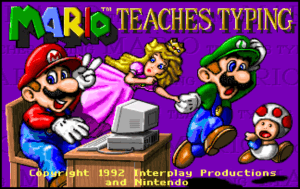
Mario Teaches Typing is a classic typing skill educational game that has helped countless players improve their keyboard dexterity, attention, focus, and memory. Designed to make learning how to type fun and engaging, it combines the charm of the beloved Mario franchise with effective typing lessons. As the typing skill educational game that helps enhance dexterity, attention and focus, and memory, it remains a popular choice for beginners and younger audiences looking to build essential computer skills.
What is Mario Teaches Typing? An overview
History, Origin
Mario Teaches Typing was developed and published by Interplay Productions in the early 1990s. It was created as an educational spin-off of the popular Mario franchise by Nintendo, aiming to combine entertainment with learning. The game quickly gained popularity due to its approachable gameplay and the iconic character Mario guiding players through typing lessons. It was part of a wave of educational software that sought to make computer literacy accessible and enjoyable for children and beginners.
Versions and Editions
Since its initial release, Mario Teaches Typing has seen multiple editions, including Mario Teaches Typing 2, which added more lessons and improved graphics. The game is generally available for PC platforms, primarily Windows and older Macintosh systems. Prices vary depending on edition and availability, typically ranging from $10 to $30 for boxed or digital copies on resale markets. The game is mostly available in English, though some versions have been localized into other languages such as Spanish and French.
Platform availability
The game was originally designed for Windows 3.x and later Windows versions, as well as Macintosh computers of the era. It is primarily a desktop experience, with no official releases on modern consoles or mobile devices.
Level of complexity
Mario Teaches Typing is designed for beginners and young learners, offering a gentle learning curve. It starts with basic home row keys and gradually introduces more complex typing exercises. The game balances educational content with fun gameplay to keep users engaged without overwhelming them.
Audience & Age
The game targets children and novice typists, typically ages 6 and up. However, it can also be useful for adults seeking to improve their typing fundamentals in a lighthearted way. Its approachable design makes it suitable for classroom use and home learning alike.
Educational Value – What skills does Mario Teaches Typing develop?
- Dexterity: The game enhances finger coordination by guiding players through structured typing drills. Repetitive practice helps build muscle memory for faster and more accurate keystrokes.
- Attention and focus: Players must concentrate on the screen prompts and type quickly to progress, improving their ability to focus on tasks without distraction.
- Memory: By learning key positions and practicing sequences, users improve their visual and motor memory, essential for fluent typing.
Prior knowledge is minimal; basic familiarity with a keyboard is helpful but not required, as the game teaches from the ground up.
How to play Mario Teaches Typing?
What does it look like?
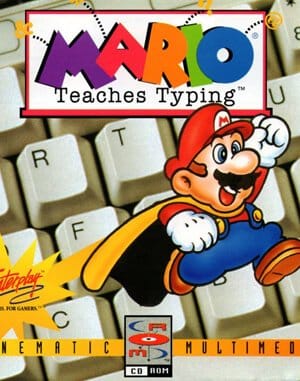
The game features colorful 2D graphics typical of early 1990s PC titles, with Mario himself appearing to encourage and guide players. When purchased, the game generally comes as a CD-ROM or floppy disk, depending on the edition. It requires a PC running Windows 3.x or later, with minimal hardware demands such as a basic keyboard and mouse. No internet connection is needed, making it a self-contained learning tool.
Core concept, gameplay style & mechanics
The gameplay revolves around timed typing exercises where players must quickly and accurately type letters or words displayed on the screen. The game uses a combination of drills, mini-games, and Mario-themed challenges to maintain engagement. Progress is tracked, and players receive feedback to improve their speed and accuracy.
Objective of the game
The main goal is to improve typing skills through consistent practice and gradual difficulty increase. Players aim to complete lessons, improve their words-per-minute (WPM) rate, and reduce errors. Success unlocks new levels and challenges, motivating continued learning.
Initial Setup and learning curve
Setting up is straightforward: install the game on a compatible PC, configure keyboard settings if needed, and start with the introductory lessons. The learning curve is gentle, starting with home row keys and advancing as the player gains confidence.
Step-by-step Basic Gameplay Loop
- Launch the game and select a lesson or mini-game.
- Follow on-screen prompts to type letters or words.
- Receive immediate feedback on accuracy and speed.
- Complete the exercise to unlock the next challenge.
- Repeat and practice regularly to improve skills.
Common mistakes
- Rushing and sacrificing accuracy for speed.
- Not using proper finger placement, which can slow progress.
- Skipping lessons and missing foundational skills.
Expert tips
- Focus on accuracy first; speed will naturally improve.
- Practice regularly in short sessions to avoid fatigue.
- Use the game’s feedback to correct finger placement and posture.
- Take breaks to maintain attention and reduce errors.
Alternative games to Mario Teaches Typing
If you enjoy this typing skill educational game, two great alternatives are Mavis Beacon Teaches Typing and Typing of the Dead. Mavis Beacon is a long-standing typing tutor known for its comprehensive lessons and customizable difficulty, appealing to a wide age range. Typing of the Dead offers a unique twist by combining typing practice with a zombie-themed action game, making it more exciting for older players who want to improve typing skills in a fun, fast-paced environment.
FAQ
Is Mario Teaches Typing suitable for complete beginners?
Yes, the game is designed to teach typing from the basics, making it ideal for users with little to no prior typing experience.
Can Mario Teaches Typing improve typing speed?
Absolutely. By practicing regularly with the game’s structured lessons, players can increase their typing speed and accuracy over time.
What are the system requirements for Mario Teaches Typing?
The game requires a Windows PC (originally Windows 3.x or later) or compatible Macintosh system, with a keyboard and mouse. It has very low hardware demands compared to modern software.
Does Mario Teaches Typing support multiple languages?
The primary language is English, though some versions have been localized into other languages like Spanish and French.
Where can I buy Mario Teaches Typing?
It can be found on resale sites, vintage software stores, or digital marketplaces specializing in classic games. Prices vary depending on edition and condition.
For Further Learning and Playing
Once you’ve built a foundation with Mario Teaches Typing, continuing your typing education with games like Nitrotype and Keybr is a great choice. Nitrotype is an online multiplayer typing racing game that adds competitive excitement to improving speed and accuracy. It motivates players to type faster in real-time races against others, making practice social and fun. Keybr, on the other hand, focuses on adaptive lessons that adjust to your weaknesses, offering a more personalized learning experience. Both games complement the skills developed in Mario Teaches Typing and provide modern, accessible platforms for continued growth.
To sum up
Mario Teaches Typing remains a beloved educational game that effectively teaches typing skills through engaging gameplay featuring a familiar character. It helps develop dexterity, attention, focus, and memory, making it a valuable tool for beginners. With its approachable lessons and fun style, it sets a solid foundation for further typing improvement through alternatives like Nitrotype and Keybr.
Sources:
- Wikipedia – Mario Teaches Typing
- MobyGames – Mario Teaches Typing
- IGN Archive – Mario Teaches Typing
Player Reviews
There are no reviews yet. Be the first one to write one.