
Algebra Touch is a captivating algebra manipulation puzzle that helps enhance mathematical reasoning, problem-solving, deductive reasoning, and pattern recognition. Designed to make algebra intuitive and engaging, it offers a fresh approach to understanding equations through interactive gameplay. Whether you’re a student looking to strengthen your skills or just someone curious about math puzzles, this game brings algebra to life in a fun and approachable way.

What is Algebra Touch? An overview
History, Origin
The game was developed by Mikael Naramore, an educator and game designer with a passion for making math accessible. Launched initially as a mobile app, it quickly gained recognition for its unique tactile approach to algebra. Instead of traditional drills, the game uses touch-based interactions that mimic real algebraic manipulations, making abstract concepts tangible and easier to grasp.
Versions and Editions
Algebra Touch is primarily available as a digital app for iOS devices. The app is free with In App Purchases. So far it is only available in English.
Platform availability
The game is mainly designed for iPhone and iPad, leveraging touchscreen capabilities to enhance the learning experience. There is no official PC or console version, so mobile devices remain the primary platform.
Level of complexity
The game starts with basic algebraic concepts and gradually introduces more complex problems. It is suitable for beginners and intermediate learners who want to deepen their understanding of algebraic manipulation without feeling overwhelmed.
Audience & Age
Algebra Touch is ideal for middle school and high school students, but it also appeals to adults who enjoy brain-training puzzles. Its intuitive design ensures that players with minimal prior algebra knowledge can engage with the material effectively.
Educational Value – What skills does Algebra Touch develop?
- Mathematical reasoning: The game challenges players to understand and apply algebraic rules logically, reinforcing core concepts in a hands-on manner.
- Problem-solving: Each puzzle encourages creative thinking to isolate variables and simplify expressions, honing analytical skills.
- Deductive reasoning: Players must deduce the correct sequence of operations to solve equations, improving logical deduction capabilities.
- Pattern recognition: Repeated exposure to algebraic structures helps players identify patterns and relationships within equations.
Prior knowledge of basic arithmetic and an understanding of variables and simple equations will help players get started quickly. However, the game’s step-by-step approach supports gradual learning.
How to play Algebra Touch?
What does it look like?
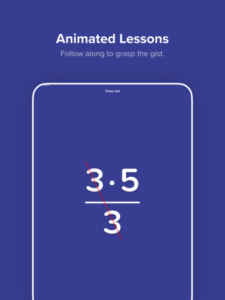
The game features a clean, minimalist interface designed for touch interaction. Players manipulate algebraic expressions by dragging and dropping components, tapping to perform operations like addition, subtraction, multiplication, and division.
Available exclusively as a digital app, it requires an iOS device running iOS 9.0 or later. The app is lightweight and optimized for smooth performance on both iPhones and iPads.
Core concept, gameplay style & mechanics
The core concept is to solve algebraic equations by physically manipulating terms on the screen. This tactile method replaces traditional symbolic manipulation with intuitive gestures, making abstract math more concrete.
Gameplay involves simplifying equations step-by-step, isolating variables, and balancing both sides of an equation. The mechanics encourage experimentation and trial-and-error, supported by immediate visual feedback.
Objective of the game
The primary goal is to solve algebraic equations correctly and efficiently. Players aim to isolate the variable on one side of the equation, mastering algebraic principles through practice and exploration.
Initial Setup and learning curve
Getting started is straightforward. After installing the app, players receive a tutorial introducing the touch controls and basic algebraic operations. The learning curve is gentle, with puzzles increasing in difficulty as skills improve.
Step-by-step Basic Gameplay Loop
- Read the given algebraic equation on the screen.
- Use touch gestures to manipulate terms—drag, combine, or move them.
- Apply algebraic operations to simplify the equation.
- Isolate the variable by balancing both sides.
- Verify the solution and proceed to the next puzzle.
Common mistakes
- Moving terms without applying inverse operations correctly.
- Failing to maintain equation balance when manipulating terms.
- Skipping steps in simplification, leading to errors.
Expert tips
- Take advantage of the game’s undo feature to experiment freely without penalty.
- Focus on understanding why each manipulation works rather than just completing puzzles.
- Practice regularly to improve speed and accuracy.
Alternative games to Algebra Touch
If you enjoy this algebra manipulation puzzle, consider exploring DragonBox Algebra 5 and DragonBox Algebra. Both games are excellent alternatives that also focus on making algebra accessible through game mechanics.
DragonBox Algebra 5 is tailored for younger learners with engaging visuals and simpler puzzles, while DragonBox Algebra offers a broader range of challenges suitable for older students. These alternatives complement Algebra Touch by reinforcing algebraic concepts in different interactive formats.
FAQ
What devices can I use to play Algebra Touch?
The game is available on iOS devices including iPhones and iPads. It requires iOS 9.0 or later, and there is no official version for Android, PC, or consoles.
Do I need prior algebra knowledge to play?
Basic understanding of arithmetic and simple equations helps, but the game is designed to teach algebraic manipulation gradually, so beginners can play and learn effectively.
How does Algebra Touch help improve math skills?
It enhances mathematical reasoning by allowing players to interact with equations physically, improving problem-solving, deductive reasoning, and pattern recognition through engaging puzzles.
Is Algebra Touch suitable for all ages?
While it is primarily aimed at middle school and high school students, adults interested in math puzzles can also enjoy and benefit from the game.
Can I play Algebra Touch offline?
Yes, once downloaded, the game can be played offline without an internet connection.
For Further Learning and Playing
To continue your math journey after Algebra Touch, consider DragonBox Elements and The Witness. DragonBox Elements explores geometry concepts through interactive puzzles, providing a natural progression from algebraic thinking to spatial reasoning.
The Witness, while not strictly an algebra game, offers complex puzzle-solving that further develops deductive reasoning and pattern recognition skills, complementing what you learn in Algebra Touch.
To sum up
Algebra Touch is a unique, tactile algebra puzzle game that effectively enhances mathematical reasoning, problem-solving, deductive reasoning, and pattern recognition. Its intuitive design and interactive approach make learning algebra enjoyable and accessible.
To Play Algebra Touch Right Now
- Smartphone: Apple App Store
Sources
Player Reviews
There are no reviews yet. Be the first one to write one.